
Locate Your Samsung Phone with These Helpful Tips
How to Find Your Samsung Phone
Losing your phone can be a stressful experience, but if you own a Samsung device, there are several ways to track and locate it quickly. Here are some methods to help you find your Samsung phone:
Use Find My Mobile
Samsung offers a service called Find My Mobile, which allows you to track your device’s location, lock it remotely, and even wipe its data in case of theft or loss. Simply log in to the Find My Mobile website using your Samsung account credentials to access these features.
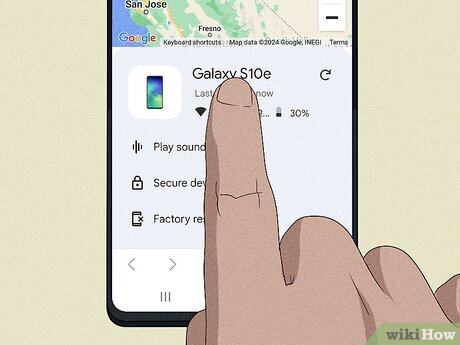
Use Google’s Find My Device
If you have enabled Google’s Find My Device feature on your Samsung phone, you can use it to locate your device on a map, ring it at full volume (even if it’s set to silent), or lock and erase its data remotely. Visit the Find My Device website or use the app on another device to access these functions.
Contact Your Service Provider
If you’re unable to locate your phone using the above methods, contact your service provider immediately. They may be able to help track the last known location of your device or suspend its services to prevent unauthorized use.
Inform Authorities
If you suspect that your phone has been stolen, report the incident to the authorities as soon as possible. Provide them with any relevant information, such as the device’s IMEI number and last known location, to aid in their investigation.
By following these steps and staying calm, you can increase the chances of finding your lost or stolen Samsung phone. Remember to always keep important information backed up and secure in case of unforeseen circumstances.
Top 6 Benefits of Using Samsung’s Find My Mobile Service
- Track your Samsung phone’s location quickly and accurately.
- Remotely lock your device to prevent unauthorized access.
- Erase sensitive data from your phone in case of theft or loss.
- Ring your phone at full volume, even if it’s on silent mode.
- Access Find My Mobile features with your Samsung account credentials.
- Utilize Google’s Find My Device feature for additional tracking options.
Potential Drawbacks of Samsung Phone Tracking: Privacy, Connectivity, and Battery Limitations
- Privacy concerns related to tracking and remote access features
- Dependence on internet connectivity for accurate location tracking
- Potential limitations in functionality based on the phone’s battery level or settings
Track your Samsung phone’s location quickly and accurately.
Tracking your Samsung phone’s location quickly and accurately is a significant advantage that can provide peace of mind in case of loss or theft. With the ability to pinpoint the exact whereabouts of your device using advanced technology, you can take swift action to retrieve it or ensure that your data remains secure. This feature not only saves time and effort but also offers a sense of reassurance knowing that you can track your Samsung phone with precision whenever needed.
Remotely lock your device to prevent unauthorized access.
By utilising the feature to remotely lock your Samsung phone, you can effectively safeguard your device and prevent unauthorised access to your personal information. This proactive measure adds an extra layer of security, ensuring that even if your phone is lost or stolen, your data remains protected. The ability to lock your device from a distance offers peace of mind and empowers you to take swift action in safeguarding your privacy and sensitive data.
Erase sensitive data from your phone in case of theft or loss.
In the unfortunate event of theft or loss of your Samsung phone, one significant advantage of using tracking services like Find My Mobile is the ability to remotely erase sensitive data stored on your device. This proactive measure helps safeguard your personal information, such as contacts, messages, and photos, from falling into the wrong hands. By swiftly initiating a remote data wipe through such services, you can protect your privacy and prevent potential misuse of confidential data, providing peace of mind amidst a stressful situation.
Ring your phone at full volume, even if it’s on silent mode.
One of the key advantages of using the “Find My Device” feature on your Samsung phone is the ability to ring your device at full volume, even when it’s set to silent mode. This feature comes in handy when you’ve misplaced your phone nearby but can’t locate it due to it being on silent. By remotely triggering the ring function, you can easily follow the sound and quickly retrieve your device, saving you time and alleviating the stress of searching for a muted phone.
Access Find My Mobile features with your Samsung account credentials.
By accessing Find My Mobile features with your Samsung account credentials, you gain the advantage of being able to track, lock, and erase data from your Samsung phone remotely. This convenient and secure method ensures that even if your device is lost or stolen, you can take immediate action to protect your personal information and locate your phone with ease. By utilising your Samsung account credentials, you have the power to safeguard your device and maintain control over its security at all times.
Utilize Google’s Find My Device feature for additional tracking options.
By utilising Google’s Find My Device feature on your Samsung phone, you gain access to additional tracking options that can greatly enhance your ability to locate your device. This feature allows you to pinpoint the exact location of your phone on a map, trigger a loud ring even if the device is on silent mode, as well as remotely lock or erase its data for added security. With these advanced tracking capabilities, you can increase the likelihood of successfully retrieving your lost or stolen Samsung phone.
Privacy concerns related to tracking and remote access features
Privacy concerns arise when utilizing tracking and remote access features to find a Samsung phone. While these tools can be incredibly useful in locating a lost or stolen device, they also raise questions about the extent of personal data that is being accessed and potentially shared. Users may feel uneasy about the level of surveillance involved in tracking their phone’s location or remotely locking and erasing its data. It is essential for users to weigh the benefits of these features against their privacy implications and take necessary precautions to safeguard their personal information while using such services.
Dependence on internet connectivity for accurate location tracking
One drawback of using services like Find My Mobile or Google’s Find My Device to locate a Samsung phone is the reliance on internet connectivity for accurate location tracking. In situations where the lost device is not connected to the internet or has a weak signal, the ability to pinpoint its exact location may be compromised. This limitation can hinder efforts to retrieve the phone promptly, especially in areas with poor network coverage. Users should be aware of this dependency on internet access when relying on such tracking services and consider alternative methods in scenarios where connectivity issues may impede successful location tracking.
Potential limitations in functionality based on the phone’s battery level or settings
When attempting to locate a Samsung phone using tracking services like Find My Mobile or Google’s Find My Device, one potential con to consider is the limitations in functionality that may arise based on the phone’s battery level or settings. If the phone’s battery is low or the device is switched off, tracking features may not work effectively, making it challenging to pinpoint its exact location. Additionally, if certain settings such as location services or data connectivity are disabled, the ability to track the phone remotely may be hindered. It is important to be aware of these potential limitations and ensure that your phone’s settings are optimised for tracking in case of loss or theft.