
How to Choose the Right Case Management System for Your Organisation
What Is a Case Management System?
A case management system is software that helps an organisation manage cases from the first contact through to resolution. A “case” could be a customer enquiry, insurance claim, legal matter, social care referral, support request or compliance investigation. The system brings relevant information, tasks and communications together so that staff can manage each case consistently and keep track of what needs to happen next.
Rather than relying on scattered emails, spreadsheets and paper files, teams can use a shared system to record activity, assign work and monitor progress. The exact features vary, but the aim is broadly the same: to make complex work easier to organise, understand and complete.
How does a case management system work?
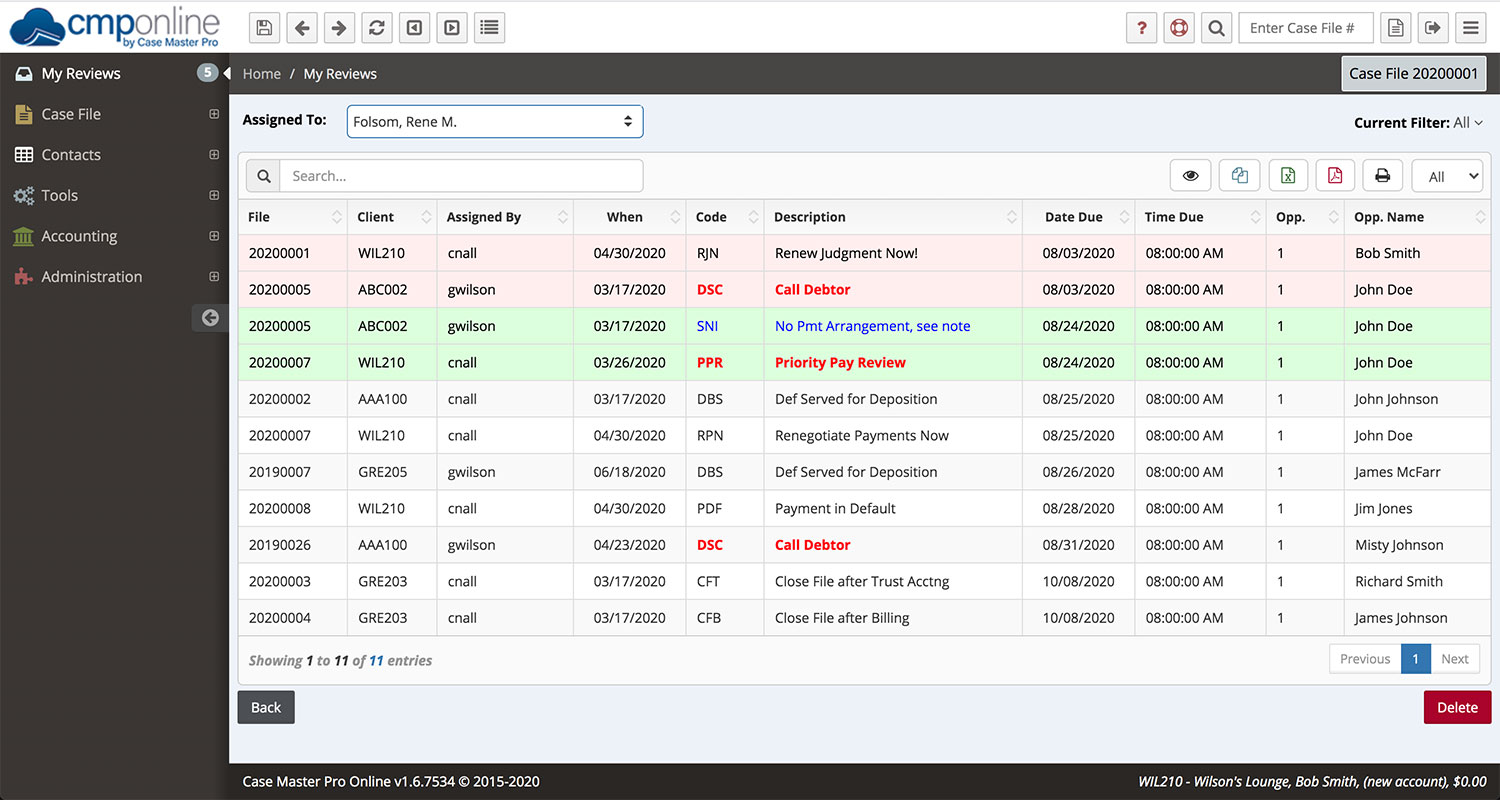
A case is usually created when an enquiry, referral or request is received. Staff record key details, such as the people involved, the issue, important dates and any supporting documents. The case can then be assigned to an individual or team, with tasks and deadlines added as required.
As work progresses, staff update the case with notes, decisions, correspondence and other relevant information. Managers can review open cases, identify delays and check whether procedures are being followed. Once the matter is resolved, the case can be closed and retained in line with the organisation’s record-keeping policies.
Common features
Case management systems can be tailored to different industries, but many include features such as:
- Case records: A central place to store details, notes and documents relating to each case.
- Task and workflow management: Tools for assigning responsibilities, setting deadlines and guiding staff through standard processes.
- Communication history: A record of relevant emails, calls, messages and meetings.
- Alerts and reminders: Notifications about upcoming deadlines, overdue tasks or changes to a case.
- Search and reporting: Ways to find records and analyse information such as case volumes, resolution times and workload.
- Access controls: Permissions that help ensure staff can view or edit only the information they are authorised to access.
- Integrations: Connections to other tools, such as document storage, email, finance or customer relationship management software.
Benefits for organisations
Better organisation
Keeping case information in one place can reduce the need to search through separate systems. Staff can see a case’s history, current status and next steps, helping to avoid missed details and duplicated work.
Clearer accountability
When tasks and responsibilities are recorded, it is easier to understand who is handling each part of a case. Managers can also get a clearer view of workloads and identify cases that may need additional attention.
More consistent processes
Workflows can help staff follow agreed procedures, particularly when a case involves several stages or teams. This can support consistency while still allowing authorised staff to respond to individual circumstances.
Improved service
With a clearer picture of previous interactions and outstanding actions, staff may be better placed to provide timely, informed responses. This is valuable wherever people rely on an organisation to handle requests or complex matters carefully.
Useful management information
Reports can help an organisation understand patterns in its work, such as the types of cases received, how long they take to resolve and where delays occur. This information can inform planning and service improvements.
Choosing the right system
The right case management system depends on the organisation’s needs. Before comparing products, it is useful to map out how cases are handled today and identify what needs to improve. Consider questions such as:
- What kinds of cases will the system manage?
- Which teams and external partners need access?
- What information must be recorded, and how sensitive is it?
- Which workflows, approvals and deadlines need to be supported?
- Does the system need to connect with existing software?
- What reporting, accessibility and support requirements apply?
- How will the system be maintained and paid for over time?
It is also important to assess usability. A system may have extensive features, but it will be less effective if staff find it difficult to use. Demonstrations based on realistic tasks can help teams understand whether the software suits their day-to-day work.
Planning a successful implementation
Introducing a case management system involves more than installing software. Successful projects usually begin with clear goals and a shared understanding of existing processes. Organisations should decide which information needs to be transferred, who will be responsible for data quality and how access will be managed.
Staff training is another essential part of implementation. Users need to understand not only how to operate the system, but also how it supports their work and what information they are expected to record. A phased rollout can provide an opportunity to gather feedback and make adjustments before the system is used more widely.
After launch, the organisation should review whether the system is meeting its objectives. Measures might include response times, overdue cases, staff workload or user feedback. Regular reviews can help identify opportunities to improve workflows and training.
Security and information governance
Case records may contain personal, confidential or otherwise sensitive information. Organisations should consider security and privacy throughout the selection and implementation process. Relevant measures may include role-based access, secure authentication, audit logs, backup arrangements and clear retention rules.
For organisations operating in the UK, data handling should be assessed against applicable data protection requirements, including the UK GDPR and the Data Protection Act 2018. Requirements will depend on the organisation and the information it processes, so appropriate legal, privacy and security advice may be needed.
Conclusion
A case management system can help organisations coordinate work, maintain reliable records and gain a clearer view of how cases are progressing. Its value depends on choosing a solution that fits the work, setting it up around sound processes and giving staff the training and support they need. With careful planning, it can provide a practical foundation for managing cases more effectively.
Understanding Case Management Systems: Key Questions Answered
- What is client case management system?
- Why do we need a case management system?
- What are the benefits of a case management system?
- How much is a case management system?
- What is a case management system legal?
- What is a case management systems?
What is client case management system?
A client case management system is software that helps an organisation manage its work with clients in one place. It can store client details and case notes, track communications, assign tasks, set reminders and monitor progress from first contact through to resolution. Used by organisations such as law firms, charities, healthcare providers and support services, it helps staff keep information organised and coordinate work while managing access to sensitive records appropriately.
Why do we need a case management system?
A case management system helps keep case details, documents, communications and tasks organised in one place. It makes it easier for teams to track progress, meet deadlines, assign responsibilities and follow consistent processes. By reducing reliance on scattered emails and spreadsheets, it can save time, minimise errors and help staff provide a more timely, informed service.
What are the benefits of a case management system?
A case management system brings case information, documents, communications and tasks together in one place, making work easier to organise and track. It can help teams follow consistent processes, assign responsibilities clearly, meet deadlines and reduce duplicated or missed tasks. Managers can also use reporting tools to monitor workloads, identify delays and spot opportunities to improve services. With appropriate access controls, the system can support secure, well-managed records and help staff provide more informed, timely responses.
How much is a case management system?
The cost of a case management system varies depending on the number of users, the features required, how much customisation is needed and whether the software is cloud-based or hosted in-house. Providers may charge a monthly or annual subscription, a one-off licence fee, or additional costs for set-up, training, support and integrations. To compare options fairly, ask for a detailed quote based on your organisation’s needs and check the full cost over time, not just the advertised starting price.
What is a case management system legal?
A legal case management system is software used by law firms and legal teams to organise and manage matters from opening a file to closing it. It can bring together client and case details, documents, correspondence, deadlines, tasks and time records, helping staff keep work organised and track progress. Features vary, so organisations should choose a system that suits their workflows and meets their security and data-protection requirements.
What is a case management systems?
A case management system is software that helps an organisation record, organise and track cases from initial contact through to resolution. A case might be a customer enquiry, support request, legal matter, insurance claim or social care referral. The system brings together information, documents, communications, tasks and deadlines, making it easier for teams to manage work consistently and see what needs to happen next.