
UX Interaction Design: Principles for Creating Better Digital Experiences
UX Interaction Design: Creating Clear, Useful Digital Experiences
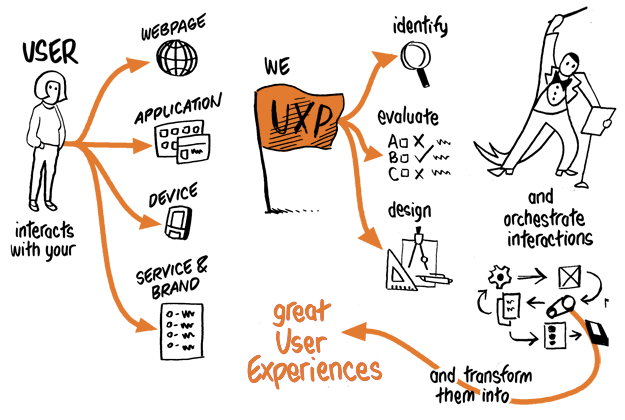
Every time someone taps a button, fills in a form or moves through a website, they are interacting with a digital product. The quality of those interactions can make the difference between an experience that feels simple and satisfying and one that feels confusing or frustrating. UX interaction design focuses on making these moments clear, purposeful and easy to use.
What is UX interaction design?
User experience (UX) design considers the full experience a person has when using a product or service. It includes everything from finding a website to completing a task and getting help when something goes wrong.
Interaction design is a part of UX design. It focuses on how people and products respond to one another: what happens when someone clicks, taps, types, scrolls or makes a mistake. A well-designed interaction gives users useful feedback and helps them understand what to do next.
For example, when someone submits an online form, the interface should show that it has been received. If a required field is missing, the page should explain what needs attention and how to fix it. These details may be small, but they shape the overall experience.
Why interaction design matters
Good interaction design helps people complete tasks with confidence. It can reduce errors, make information easier to understand and help users feel in control. For organisations, this can lead to more completed purchases, fewer support requests and stronger customer relationships.
Poor interactions often create unnecessary effort. A button that does not look clickable, an unclear error message or a lengthy form with no progress indicator can make users abandon a task. Designing interactions around people’s needs helps prevent these problems.
Principles of effective interaction design
Make actions clear
Users should be able to tell what an interface element does. Use familiar labels such as “Save changes” or “Add to basket” rather than vague wording. Make interactive elements visually distinct from ordinary text and ensure that their purpose is clear.
Provide immediate feedback
When users take an action, the product should respond. A button might change state after being selected, a message might confirm that a file has uploaded, or a loading indicator might show that a request is being processed. Feedback reassures people that the system has registered their action.
Be consistent
Similar actions should work in similar ways throughout a product. Consistent layouts, wording and controls reduce the amount users need to learn. Established design patterns can also help, provided they suit the task and the people using the product.
Prevent and explain errors
Where possible, design interfaces to prevent common mistakes. For example, a date picker can reduce errors when entering dates. If an error does occur, explain what happened in plain language and offer a practical way to resolve it. Avoid blaming the user or relying on technical error codes.
Keep the experience accessible
Interaction design should work for people with different abilities, devices and ways of navigating. This means considering keyboard use, screen readers, colour contrast, readable text and sufficiently large touch targets. Information should not be communicated by colour alone, and important controls should have clear names for assistive technologies.
The interaction design process
Interaction design is not simply a matter of choosing colours and arranging buttons. It starts with understanding the people who will use the product and the tasks they need to complete.
- Research users and context: Learn about users’ needs, goals, environments and potential barriers through interviews, observation, surveys or existing research.
- Map the journey: Set out the steps people take to complete a task. This can reveal confusing transitions, unnecessary actions or missing information.
- Sketch and prototype: Explore possible layouts and interactions. A simple prototype can show how a user moves through a task before the design is fully built.
- Test with users: Observe people using the prototype to find out where they hesitate, make mistakes or misunderstand the interface.
- Improve and measure: Refine the design and assess whether it helps users succeed. Useful measures might include task completion, error rates, time taken and user feedback.
Designing for the whole interaction
An interaction is more than the moment a user presses a control. It includes what happens before, during and after the action. A useful button needs clear wording and a suitable size; it also needs to respond reliably and communicate the result.
Consider an online booking process. Users need to understand which dates are available, review the details they have entered and know what will happen after they confirm. If the booking fails, they need to know whether their payment was taken and what to do next. Thinking through the complete sequence helps create a coherent experience rather than a collection of isolated screens.
Common challenges
Design teams can be tempted to add features because they seem impressive, even when they make a product harder to use. Another common challenge is designing only for ideal conditions, such as a fast internet connection or a large screen. Real users may be working on older devices, using a keyboard or screen reader, or trying to complete a task while distracted.
These challenges can be addressed by prioritising the user’s main goals, testing realistic scenarios and treating accessibility as part of the design process from the outset. Regular feedback from users is especially valuable because it can reveal problems that are easy to miss within a project team.
Conclusion
UX interaction design is about making digital products understandable, responsive and considerate of the people who use them. Clear actions, helpful feedback, accessible controls and thoughtful error handling all contribute to a better experience. By researching user needs, testing designs and improving them over time, teams can create interactions that help people complete tasks with less effort and greater confidence.
UX Interaction Design FAQs: Careers, Salaries and UX vs UI
- What is UX interaction design?
- How do I become an UX interaction designer?
- Is UX harder than UI?
- Is interaction design similar to UX?
- Is UI/UX a high paying job?
What is UX interaction design?
UX interaction design is the practice of designing how people interact with a digital product, such as a website or app. It focuses on making actions—like tapping a button, completing a form or navigating a menu—clear, intuitive and responsive. Good interaction design provides helpful feedback, prevents or explains errors, and makes it easier for people to complete tasks confidently.
How do I become an UX interaction designer?
To become a UX interaction designer, start by learning the fundamentals of user experience, interaction design, accessibility and visual communication. A degree in design or a related subject can help, but it is not essential: online courses, books and practical projects are also valuable ways to build your skills. Practise researching users, mapping journeys, creating wireframes and prototypes, and testing designs with real people using tools such as Figma. Build a portfolio that explains the problem, your design decisions and what you learnt from testing, then look for internships, junior roles or freelance projects to gain experience. Clear communication, curiosity and a willingness to improve your work are just as important as technical skills.
Is UX harder than UI?
Neither UX nor UI is inherently harder; they involve different challenges and work best together. UX design focuses on understanding users, researching their needs and shaping how a product works from start to finish, which can involve complex problems with no single right answer. UI design focuses on the visual and interactive details, such as layouts, colours, typography and controls, requiring strong visual judgement and attention to detail. Which feels harder depends on your skills, interests and the project—both require thought, practice and collaboration.
Is interaction design similar to UX?
Interaction design is closely related to UX design, but the two are not quite the same. UX design covers a person’s overall experience with a product or service, from discovering it to completing tasks and getting support. Interaction design is one part of that broader experience, focusing on how users interact with the interface and how it responds to actions such as clicking, tapping or typing. In short, interaction design helps shape the practical moments that contribute to a positive UX.
Is UI/UX a high paying job?
UI/UX can be a well-paid career, but salaries vary depending on factors such as experience, location, industry and the size of the organisation. Senior designers and specialists with strong research, interaction design or product strategy skills may earn more, while entry-level roles typically pay less. Demand for skilled UI/UX professionals can be strong, but building a portfolio, gaining practical experience and keeping up with changing tools and practices are important for progressing in the field.