
How to Choose the Right Mobile Charger for Your Phone
Mobile Chargers: How to Choose the Right One
A mobile charger is an everyday essential, but choosing the right one can be less straightforward than it seems. Different phones support different charging speeds and standards, while chargers vary in power, ports and design. Understanding the basics can help you charge your device efficiently and safely.
What is a mobile charger?
The term “mobile charger” often refers to the mains adapter and cable used to charge a phone. The adapter converts electricity from a wall socket into a form the phone can use, while the cable carries power to the device. Some chargers have a built-in cable; others have one or more USB ports for a separate cable.
Wireless chargers are another option. They transfer power to a compatible phone when it is placed on a charging pad or stand. They can be convenient, although charging speed and performance depend on both the charger and the phone.
Check compatibility
Before buying a charger, check which connection your phone uses and what charging standards it supports. Many newer devices use USB-C, while some older models use different connectors. The cable must also have the correct connector at each end.
For wired charging, the phone, adapter and cable all play a part in determining charging speed. A high-powered adapter will not necessarily make an incompatible phone charge faster. Check the manufacturer’s guidance for your device’s supported power and charging technology.
Understand charging power
Charger power is measured in watts (W). In general, a charger with a higher wattage can supply more power, but the phone will only draw what it is designed to accept. If you want to use fast charging, make sure the adapter and cable support a standard compatible with your phone.
Some chargers include several ports. Bear in mind that the stated maximum output may be shared between connected devices, so each device may charge more slowly when multiple ports are in use.
Choose a charger for your needs
- For everyday use: A reliable charger with the right connector and sufficient power for your phone is usually all you need.
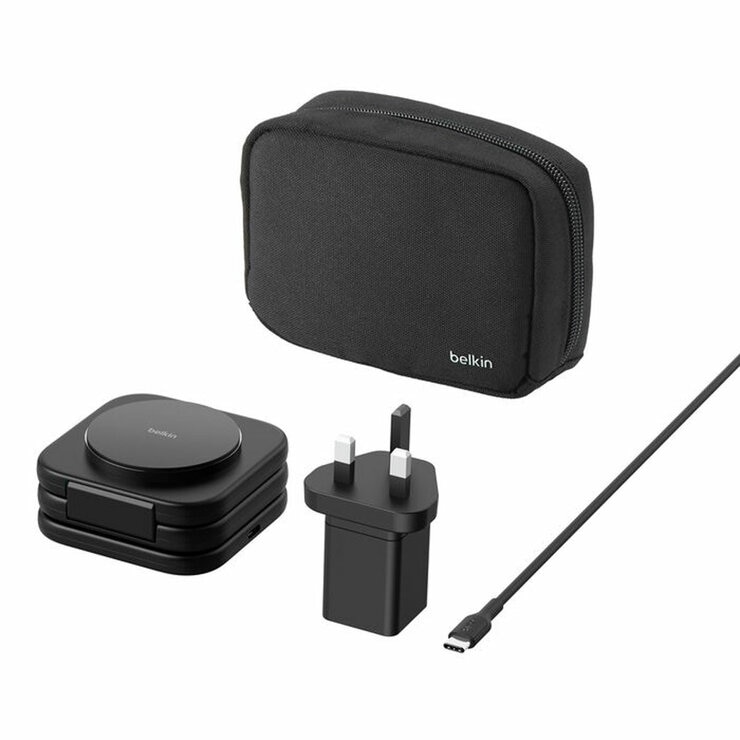
- For travel: Look for a compact model and check that it is suitable for the plug sockets at your destination. A multi-port charger can reduce the number of adapters you need to carry.
- For a desk or bedside table: A charging stand can make it easier to see your screen while the phone is charging. Wireless models need to be compatible with your device.
- For charging on the go: A power bank can provide portable power. Check its capacity, output and the cable or wireless features it supports.
Use chargers safely
Choose chargers from reputable manufacturers and buy from trustworthy retailers. Avoid products with damaged cables, loose plugs or signs of overheating. Keep chargers away from water and follow the safety instructions supplied with the product.
Use a cable that is in good condition and suitable for your device. If a charger or phone becomes unusually hot, disconnect it and check the manufacturer’s advice. Do not cover a charger while it is in use, as this can prevent heat from escaping.
Look after your battery
Modern phones manage charging automatically, so there is usually no need to let the battery run completely flat before charging it. To help maintain battery health, avoid exposing your phone to extreme temperatures and use the battery-care settings available on your device.
In summary
The best mobile charger is one that is compatible with your phone, provides the power you need and meets appropriate safety standards. Check the connector, supported charging technology and output before buying, and use a good-quality cable. A little research can make charging more convenient at home, at work and while travelling.
Top 7 Advantages of a Mobile Charger: Stay Powered and Connected
- Keeps your mobile phone powered throughout the day.
- Makes it easy to recharge at home, work or on the go.
- Fast-charging models can reduce waiting time.
- Compact chargers are convenient for travel.
- Multi-port chargers can power several devices at once.
- Wireless chargers offer cable-free convenience.
- A quality charger supports safe, reliable charging.
Potential Drawbacks of Mobile Chargers: Reliability, Heat, and Durability Issues
Keeps your mobile phone powered throughout the day.
A mobile charger helps keep your phone powered throughout the day, so you can stay in touch, check directions, manage tasks and capture important moments without worrying about the battery running flat. Whether you’re at home, at work or on the move, having a charger nearby makes it easier to top up your phone whenever you need to.
Makes it easy to recharge at home, work or on the go.
A mobile charger makes it easy to keep your phone powered wherever you are. Recharge it at home, plug it in at work or use a portable charger while travelling, so you can stay connected throughout the day.
Fast-charging models can reduce waiting time.
Fast-charging mobile chargers can reduce the time you spend waiting for your phone to power up, making them especially useful when you’re in a hurry or only have a short break to charge. For the best results, choose a charger and cable that support your phone’s fast-charging standard, as charging speed depends on all three working together.
Compact chargers are convenient for travel.
Compact mobile chargers are ideal for travel because they take up very little space in a bag or pocket. They’re easy to pack alongside your phone and other essentials, making them a practical choice for holidays, commutes and days out.
Multi-port chargers can power several devices at once.
Multi-port chargers are a convenient way to power several devices at once, such as a mobile phone, tablet and headphones. They help reduce the number of plugs and adapters needed, keeping desks and bedside tables tidier and making packing for trips easier. Check the charger’s total output, as the available power may be shared between connected devices.
Wireless chargers offer cable-free convenience.
Wireless chargers offer cable-free convenience, helping to keep desks, bedside tables and workspaces tidy. Simply place a compatible phone on the charging pad or stand—there’s no need to plug in a cable each time. This makes topping up your battery easy throughout the day, while reducing the clutter of loose wires.
A quality charger supports safe, reliable charging.
A quality mobile charger supports safe, reliable charging by delivering power consistently and including protections against problems such as overheating, overcurrent and short circuits. Choosing a reputable charger that is compatible with your phone can help protect both the device and its battery, while providing dependable charging at home or on the go.
Cheap chargers may be unreliable.
Cheap mobile chargers may seem like a bargain, but they can be unreliable. They may charge slowly, stop working sooner than expected or have cables and connectors that wear out quickly. In some cases, poor-quality chargers may also overheat or fail to meet appropriate safety standards, so it is worth choosing a reputable product that is compatible with your phone.
Fast chargers can generate heat.
Fast chargers can generate more heat than standard chargers because they deliver power at a higher rate. Some warmth during charging is normal, but excessive heat may affect battery performance over time, particularly if the phone is used heavily or left in a hot place while charging. To reduce the risk, use a compatible, reputable charger, keep the phone uncovered and stop charging if it becomes unusually hot.
Cables can wear or break.
Mobile charger cables can wear out or break with regular use, particularly if they are bent sharply, pulled from the wire or tightly wound around a device. Frayed insulation or damaged connectors may cause unreliable charging and can pose a safety risk, so replace a cable if it shows signs of damage and handle it gently to help it last longer.