
Microsoft Office 2019 Professional Plus: Features, Licensing and Support
Microsoft Office 2019 Professional Plus: Features, Licensing and Support
Microsoft Office 2019 Professional Plus is a desktop productivity suite designed primarily for organisations that want a fixed set of Office applications rather than a Microsoft 365 subscription. It includes familiar tools for writing, spreadsheets, presentations, email and database work. However, its support period has now ended, so anyone considering it should weigh its features against the security and support benefits of a current Office version.
What is Office 2019 Professional Plus?
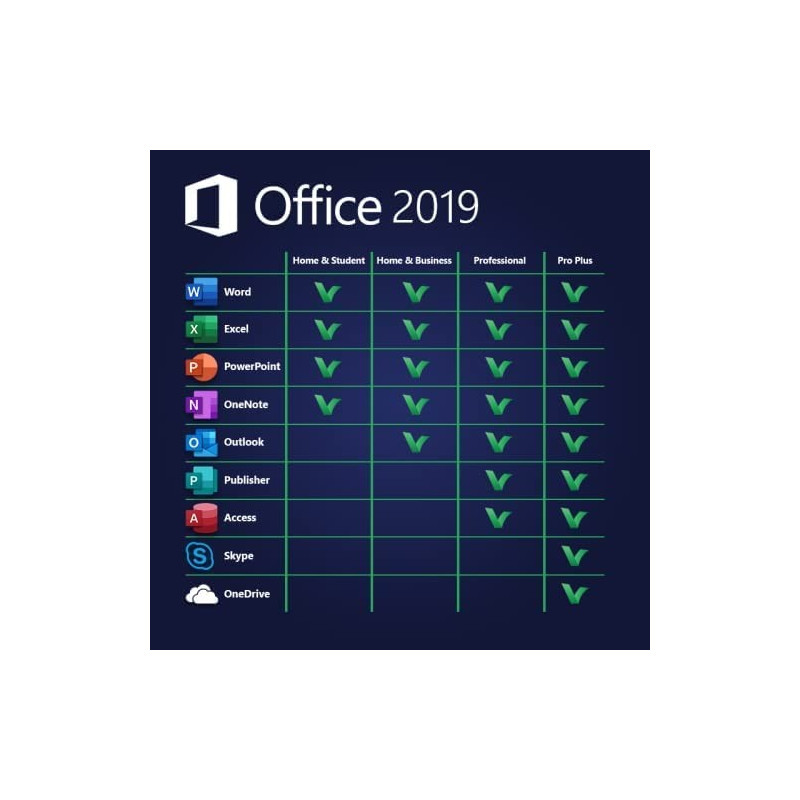
Office 2019 Professional Plus is an edition of Microsoft Office distributed mainly through volume licensing for businesses and other organisations. Depending on the licence and installation, it includes desktop versions of Word, Excel, PowerPoint, Outlook, Publisher and Access, along with Skype for Business.
Unlike Microsoft 365, Office 2019 is generally licensed as a one-off purchase for use on a specified device. It does not include an ongoing subscription to Microsoft 365 services, and it does not receive the regular feature upgrades available to subscribers. Exact rights depend on the licence terms, so buyers should check what their particular licence permits.
Key applications and features
- Word: Create and edit documents, with tools such as inking, improved accessibility features and translation options.
- Excel: Work with data using new charts and functions introduced in this release, including CONCAT, TEXTJOIN and IFS.
- PowerPoint: Build presentations with features such as Morph transitions, Zoom and support for scalable vector graphics.
- Outlook: Manage email, calendars, contacts and tasks using a desktop email client.
- Publisher: Create print and digital publications, such as flyers and newsletters.
- Access: Build and manage desktop databases for organising information and creating forms and reports.
The exact applications available can vary with the edition and licensing arrangement. Office 2019 is also a fixed release: it does not gain the newer features added to later Office versions or Microsoft 365. For example, it does not include some later Excel capabilities, such as XLOOKUP and dynamic array functions.
Office 2019 versus Microsoft 365
The main difference is the way the products are licensed and updated. Office 2019 is a fixed-version product, while Microsoft 365 is a subscription that receives ongoing feature updates and may include online services and cloud storage, depending on the plan.
A fixed release can suit organisations that prefer a consistent software environment and have a valid licence already in place. A subscription may be more appropriate for people who need the latest features, collaboration tools or continued support. Compare the specific plans and licence terms before deciding.
Important: support has ended
Microsoft Office 2019 reached the end of its support on 14 October 2025. It no longer receives security updates, bug fixes or technical support from Microsoft. The applications may continue to run, but using unsupported software can increase security and compliance risks, particularly on devices connected to the internet or used for sensitive work.
For that reason, Office 2019 Professional Plus is generally not a suitable choice for a new deployment in 2026. Organisations still using it should assess their security requirements and plan a move to a supported Office release or Microsoft 365.
Licensing and safe purchasing
Because Professional Plus is primarily a volume-licensing edition, it is important to verify that a seller can provide a legitimate licence with clear terms and appropriate documentation. A low-cost product key alone may not prove that the software is properly licensed or that the buyer has the right to use it.
Before installing Office 2019, confirm that the licence covers the intended use, check device and activation requirements, and make sure the software comes from a trustworthy source. Businesses should consult their licensing administrator or authorised supplier.
Is Office 2019 Professional Plus right for you?
Office 2019 Professional Plus offers established desktop applications and may remain relevant where an organisation already has valid licences and a planned transition path. But with support having ended, it is difficult to recommend for new installations. For ongoing security updates, assistance and access to newer capabilities, consider a currently supported Office edition or a suitable Microsoft 365 plan.
Top 5 FAQs About Microsoft Office 2019 Professional Plus: Compatibility, Licensing, and Features
- Will Office 2019 still work after October 2025?
- Is Office Professional Plus 2019 Lifetime?
- Is Microsoft Office Professional Plus 2019 free to download?
- How to activate MS Office 2019 Professional Plus permanently for free?
- What does Office 2019 Professional Plus include?
Will Office 2019 still work after October 2025?
Yes, Office 2019 may continue to work after 14 October 2025, but Microsoft support has ended. This means it no longer receives security updates, bug fixes or technical assistance, which can leave your device and data more exposed to risks over time. For continued protection and support, consider moving to a currently supported Office version or Microsoft 365.
Is Office Professional Plus 2019 Lifetime?
Office Professional Plus 2019 is generally sold as a one-off licence rather than a recurring subscription, but “lifetime” does not mean lifetime support or guaranteed use on any device. Your right to use it depends on the licence terms and may be tied to a particular device or organisation. Microsoft support for Office 2019 ended on 14 October 2025, so it no longer receives security updates or technical support, even if the software remains activated. Check the licence documentation carefully before buying, especially if a seller describes a product key as a “lifetime licence”.
Is Microsoft Office Professional Plus 2019 free to download?
No, Microsoft Office Professional Plus 2019 is not free to use: it requires a valid licence, usually provided through an organisation’s volume-licensing agreement. You may be able to download the installation files through Microsoft or your organisation, but downloading them does not grant a licence. Check that any seller provides a legitimate licence and clear terms. Office 2019 support ended on 14 October 2025, so it no longer receives security updates or technical support.
How to activate MS Office 2019 Professional Plus permanently for free?
There is no legitimate way to activate Microsoft Office 2019 Professional Plus permanently for free unless you are covered by a valid licence provided by an employer, school or other organisation. To activate it, use the genuine product key or sign in with the account linked to your licence, following Microsoft’s activation instructions. Avoid unofficial activators, cracks and shared keys: they may be illegal, expose your device to malware and put your files at risk. Office 2019 support ended on 14 October 2025, so consider moving to a currently supported Office version or Microsoft 365.
What does Office 2019 Professional Plus include?
Office 2019 Professional Plus includes desktop versions of Word, Excel, PowerPoint, Outlook, Publisher and Access, as well as Skype for Business. These applications support everyday tasks such as writing documents, analysing data, creating presentations, managing email and building databases. Availability can depend on the licence and installation, so check the specific product and licence terms before buying.