Microsoft Surface Laptop 3: Is It Still Worth Considering?
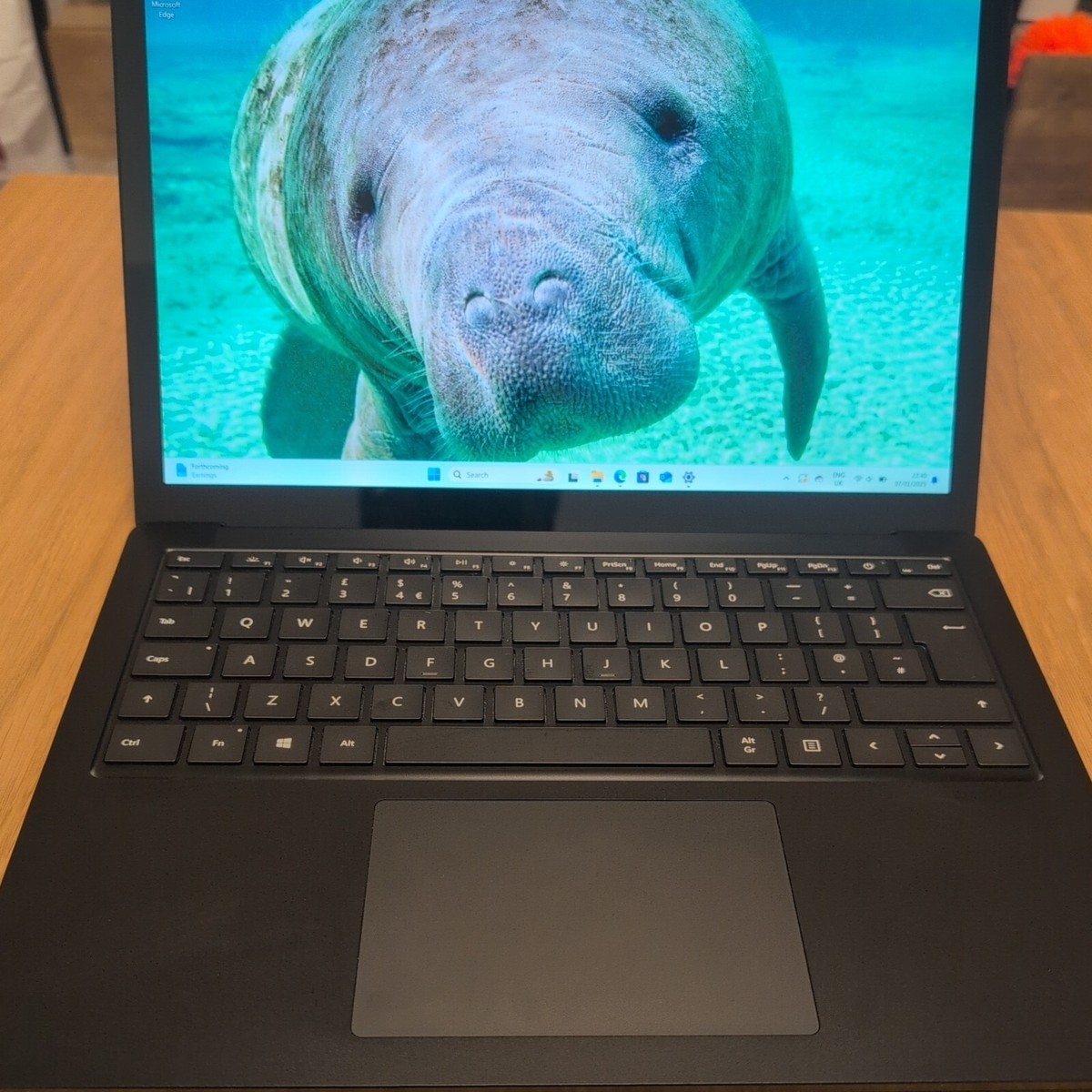
The Microsoft Surface Laptop 3 is a slim, premium Windows laptop designed for everyday work, study and entertainment. First released in 2019, it combines a sharp touchscreen with a lightweight design and a comfortable keyboard. Although it is no longer a current model, it may still be worth considering on the refurbished or second-hand market, provided its age and condition are taken into account.
Design and display
The Surface Laptop 3 was available with either a 13.5-inch or 15-inch PixelSense touchscreen. Both versions have a 3:2 aspect ratio, which gives you more vertical screen space than a typical widescreen display. This is useful for reading documents, browsing websites and working with spreadsheets.
The 13.5-inch model came in a choice of metal or Alcantara keyboard finishes, depending on the configuration. The larger 15-inch version has an aluminium finish. The laptop’s understated appearance and slim profile make it easy to carry, though its design is relatively conservative compared with some newer laptops.
Performance and specifications
Specifications vary by screen size and configuration. The 13.5-inch Surface Laptop 3 was generally sold with 10th-generation Intel Core processors, while the consumer 15-inch model used a custom AMD Ryzen processor. Certain 15-inch business configurations were also available with Intel processors.
For everyday tasks such as writing, video calls, web browsing and streaming, a well-maintained model can still perform adequately. More demanding workloads, including modern games, advanced video editing and intensive creative software, may be better suited to a newer laptop. Memory and storage options also differ, so check the exact specification before buying.
Keyboard, trackpad and connectivity
One of the Surface Laptop 3’s strongest features is its keyboard. The keys offer a comfortable typing experience, while the large precision trackpad makes navigation straightforward. It is a good choice for people who spend much of the day writing or working with documents.
Connections include USB-A, USB-C, a 3.5 mm headphone socket and Microsoft’s Surface Connect port. USB-C is useful for modern accessories and displays, but this generation does not offer Thunderbolt. If you rely on particular peripherals, check that the available ports meet your needs.
Battery life and software
Battery life depends on the model, battery health and how the laptop is used. Because the Surface Laptop 3 is several years old, a second-hand unit may not last as long on a charge as it did when new. Ask about battery condition, or test it in person if possible.
The laptop originally shipped with Windows 10 and is compatible with Windows 11. As with any older computer, it is sensible to check that the device is receiving the software and security updates you need, and to install all available updates before using it for important work.
What to check before buying
- Confirm the exact screen size, processor, memory and storage capacity.
- Inspect the screen, keyboard, trackpad, casing and charging port for damage.
- Check battery health and ask whether the original charger is included.
- Make sure the laptop can be reset and set up with your own account.
- Compare the price with newer refurbished laptops that may offer better battery life or performance.
Verdict
The Microsoft Surface Laptop 3 remains an attractive everyday laptop, particularly for typing, browsing and general productivity. Its touchscreen, comfortable keyboard and refined design are notable strengths. However, its age means that battery condition, configuration and price matter greatly. A clean, well-priced refurbished model can be a sensible choice, but buyers needing long battery life or higher performance may find better value in a newer device.
Microsoft Surface Laptop 3: 9 Frequently Asked Questions
- What is the Microsoft Surface Laptop 3?
- What screen sizes are available for the Surface Laptop 3?
- Is the Surface Laptop 3 compatible with Windows 11?
- How long does the Surface Laptop 3 battery last?
- Can the memory or storage be upgraded on the Surface Laptop 3?
- What ports does the Surface Laptop 3 have?
- Is the Surface Laptop 3 suitable for gaming?
- What should I check when buying a refurbished Surface Laptop 3?
- Is the Microsoft Surface Laptop 3 still worth buying?
What is the Microsoft Surface Laptop 3?
The Microsoft Surface Laptop 3 is a Windows laptop made by Microsoft, released in 2019. It features a touchscreen display and was available in 13.5-inch and 15-inch sizes, with different processor and specification options depending on the model. Designed for everyday tasks such as browsing, studying and office work, it is known for its slim build, comfortable keyboard and clean design.
What screen sizes are available for the Surface Laptop 3?
The Surface Laptop 3 is available with either a 13.5-inch or a 15-inch PixelSense touchscreen. Both displays have a 3:2 aspect ratio, providing extra vertical space that can be useful for reading, browsing and working on documents.
Is the Surface Laptop 3 compatible with Windows 11?
Yes, the Surface Laptop 3 is compatible with Windows 11. Before upgrading, check that your device has the latest firmware and Windows updates installed, and back up important files. Availability of the upgrade may depend on your model and update settings.
How long does the Surface Laptop 3 battery last?
The Surface Laptop 3 was advertised with up to 11.5 hours of battery life, but real-world use is typically shorter and varies with the model, screen brightness, apps and settings. On a used device, battery age and condition can make a significant difference, so check its battery health before buying.
Can the memory or storage be upgraded on the Surface Laptop 3?
The Surface Laptop 3’s SSD can be replaced or upgraded, but it is not designed for user upgrades and opening the laptop can be difficult, so professional assistance is recommended. The memory (RAM) is soldered to the motherboard and cannot be upgraded after purchase. If you are choosing a model, select enough RAM and storage for your needs from the outset, and check the exact configuration, as options vary by model.
What ports does the Surface Laptop 3 have?
The Surface Laptop 3 has one USB-A port, one USB-C port, a 3.5 mm headphone jack and a Surface Connect port for charging and compatible accessories. It does not have a built-in HDMI or Ethernet port, and the USB-C connection does not support Thunderbolt. You may need an adapter or dock to connect certain displays and peripherals.
Is the Surface Laptop 3 suitable for gaming?
The Surface Laptop 3 is suitable for casual gaming and older or less demanding titles, but it is not designed as a gaming laptop. Its integrated graphics on Intel models, or modest graphics performance on most consumer configurations, may struggle with newer games and high settings. For smoother gameplay, choose less demanding titles and lower the resolution or graphics quality; for modern, graphics-intensive games, a laptop with a dedicated graphics card is a better option.
What should I check when buying a refurbished Surface Laptop 3?
When buying a refurbished Surface Laptop 3, check the exact model and specifications, including screen size, processor, RAM and storage, as configurations vary. Inspect the display, keyboard, trackpad, ports and casing for damage, and ask about the battery’s condition, as an older battery may hold less charge. Confirm that the charger is included, the laptop can be reset and set up with your own account, and Windows is properly activated and up to date. Finally, compare the price with newer refurbished laptops and check what warranty or returns policy the seller offers.
Is the Microsoft Surface Laptop 3 still worth buying?
The Microsoft Surface Laptop 3 can still be worth buying for everyday tasks such as browsing, writing and video calls, especially if you find a well-maintained refurbished model at a good price. Its comfortable keyboard, sharp touchscreen and premium design remain appealing, but performance and battery life may fall short of newer laptops, particularly on ageing or heavily used devices. Before buying, check the exact specifications, battery condition, software support and warranty, and compare the price with newer alternatives.