
PowerPoint App: Features, Tips and a Guide to Better Presentations
Microsoft PowerPoint App: A Guide to Creating Better Presentations
The Microsoft PowerPoint app helps you create, edit and present slide-based presentations. It is used in schools, workplaces and at home, whether you are preparing a business pitch, a lesson, a project update or a photo slideshow.
What is the PowerPoint app?
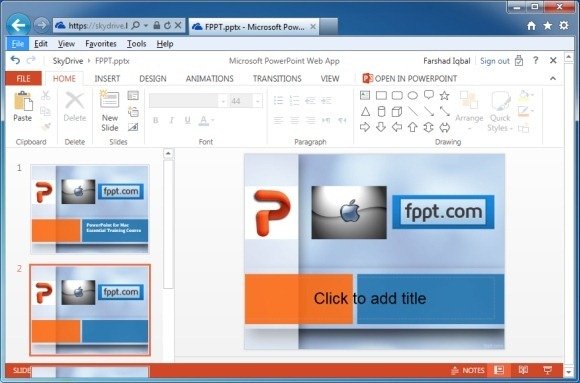
PowerPoint is presentation software from Microsoft. Its app is available on different devices, including computers, tablets and smartphones. Depending on your device and account, you may also be able to use PowerPoint in a web browser.
The app lets you build presentations from individual slides, combining text, images, charts, shapes, video and other content. You can start with a blank presentation or choose a template, then customise the design to suit your topic.
Useful features
- Templates and themes: Give slides a consistent look without designing every detail from scratch.
- Text and media: Add headings, photographs, illustrations, audio and video to help explain your ideas.
- Charts and diagrams: Present information visually, making figures and processes easier to understand.
- Transitions and animations: Add movement between slides or to individual objects. Used sparingly, these effects can help direct attention.
- Presenter tools: Depending on the version and device, tools such as notes and presenter view can help you deliver a presentation.
- Collaboration: Sharing and co-authoring features can allow people to work on the same presentation, subject to the app, account and file settings.
Using PowerPoint across devices
The experience can vary between the desktop, web and mobile versions. A computer is often convenient for building a detailed presentation, while a tablet or phone can be useful for reviewing slides, making quick edits or presenting on the go. Some features may only be available on particular devices or with certain Microsoft 365 plans.
PowerPoint files are commonly saved in the .pptx format. If you need to share a presentation with someone who should not edit it, exporting or saving a copy as a PDF may be suitable. Check the exported file before sending it, as some interactive features may not carry over.
Tips for making effective slides
- Keep each slide focused. Give it one main point rather than trying to include everything you know.
- Use concise wording. Slides work best as support for what you say, not as a script to read aloud.
- Make text easy to read. Choose clear fonts, adequate text sizes and strong contrast between text and background.
- Use images with purpose. A relevant image or diagram can clarify an idea, while decorative material may distract from it.
- Be consistent. Reuse colours, fonts and layouts so the presentation feels joined up.
- Limit effects. Too many animations or transitions can interrupt the flow and make information harder to follow.
- Rehearse and check. Review the slides on the screen or equipment you will use, and check spelling, links, media and timings.
Accessibility matters
Accessible slides are easier for more people to use. Give slides clear titles, use readable text and avoid relying on colour alone to communicate meaning. Add alternative text to informative images where the app supports it, and use captions for video when available. PowerPoint’s accessibility tools can help identify some issues, although a manual review is still worthwhile.
Is PowerPoint the right app for you?
PowerPoint is a flexible choice if you want control over slide layouts, visual elements and presenting tools. It can also be useful when you need to work with existing PowerPoint files. If you mainly need to create simple presentations collaboratively or in a browser, you may wish to compare it with other presentation tools before choosing.
For the best experience, use the version that suits your device and check Microsoft’s current information for availability, features and subscription requirements. With a clear structure and uncluttered slides, the PowerPoint app can help turn ideas into presentations that are easier to follow and remember.
PowerPoint App FAQs: Free Alternatives, Downloads, Installation and Templates
- Is there a free app like PowerPoint?
- How do I download the PowerPoint app?
- Where can I find free presentation slide templates?
- Is PowerPoint free on App Store?
- What are some PowerPoint apps?
- How do I install PowerPoint app?
Is there a free app like PowerPoint?
Yes. Google Slides is a popular free, browser-based alternative to PowerPoint, with apps for mobile devices and tools for collaborating with others. LibreOffice Impress is another free option that you can install on a computer, while Canva offers a free plan with presentation templates. Microsoft also provides a free web version of PowerPoint with a Microsoft account, although some features require a Microsoft 365 subscription.
How do I download the PowerPoint app?
To download the PowerPoint app, visit the Apple App Store on an iPhone or iPad, or the Google Play Store on an Android device, search for “Microsoft PowerPoint” and select the official app from Microsoft. On a Windows or Mac computer, download it through Microsoft 365 or the official Microsoft website; availability and features may depend on your device and subscription.
Where can I find free presentation slide templates?
You can find free presentation slide templates in PowerPoint by opening the app and browsing its template gallery, or by visiting Microsoft Create online. Other design platforms also offer free templates, but check their terms before using or sharing a template, particularly for commercial purposes. Choose a design that suits your topic, then customise the colours, fonts and layouts to keep your slides clear and consistent.
Is PowerPoint free on App Store?
Yes, you can download the Microsoft PowerPoint app for free from the App Store, but some features may require a Microsoft 365 subscription. Free features and availability can vary depending on your device, account and location, so check the app’s listing and in-app purchase details before downloading.
What are some PowerPoint apps?
Some popular apps for creating and editing PowerPoint presentations include Microsoft PowerPoint for Windows, Mac, iOS and Android, as well as PowerPoint for the web. You can also use alternatives such as Google Slides, Apple Keynote, Canva and LibreOffice Impress, some of which can open or export PowerPoint files. Features and compatibility vary, so check that the app supports the tools and file format you need.
How do I install PowerPoint app?
To install the PowerPoint app, open the official app store on your device—such as the Microsoft Store, Apple App Store or Google Play Store—search for “Microsoft PowerPoint”, then select the official Microsoft app and tap or click “Install” or “Get”. On a computer, you can also download Microsoft 365 from Microsoft’s official website if PowerPoint is included with your plan. Once installation is complete, open the app and sign in with your Microsoft account if prompted; availability and features may vary by device and subscription.