
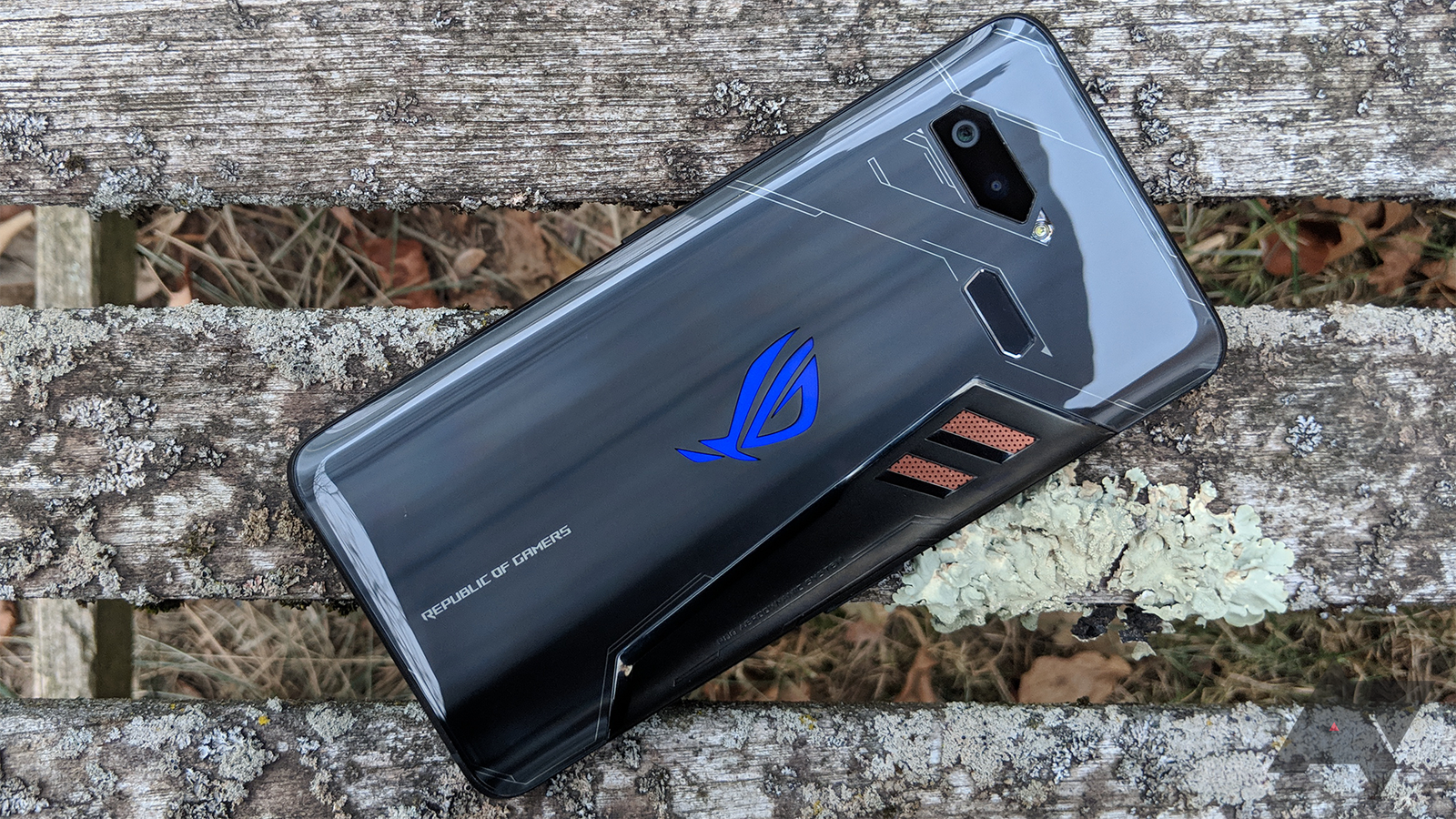
ASUS ROG Phone 2: A Powerful Gaming Phone Reviewed
ASUS ROG Phone 2: A Gaming Phone Built for the Long Haul
Released in 2019, the ASUS ROG Phone 2 was designed for people who wanted more from a gaming phone than flashy styling. It paired a high-refresh-rate display with powerful hardware, a large battery and physical controls intended to make mobile games feel more like playing on a console.
A fast, immersive display
The ROG Phone 2’s 6.59-inch AMOLED display has a resolution of 2340 × 1080 pixels and a refresh rate of up to 120Hz. That higher refresh rate can make supported games and everyday scrolling look smoother than they do on a standard 60Hz screen. The display also supports HDR content, while its flat design gives players a broad, uninterrupted area for touch controls.
Not every game runs at 120 frames per second, so the benefit depends on the titles being played. Even so, the screen remains one of the phone’s defining features.
Performance aimed at gaming
At its heart is Qualcomm’s Snapdragon 855 Plus processor, paired with up to 12GB of RAM in some configurations. The chip was a high-end option at launch, and the phone’s cooling system was designed to help manage heat during demanding gaming sessions. ASUS also included software tools for monitoring performance and adjusting settings.
The ROG Phone 2 has AirTrigger controls built into its frame. These pressure-sensitive areas can be mapped to on-screen actions, giving players extra control without covering as much of the display with their thumbs. Their usefulness depends on the game and on how each player prefers to hold the phone.
A large battery and flexible charging
A 6,000mAh battery gives the ROG Phone 2 more capacity than many conventional smartphones of its generation. This can be helpful for long gaming sessions, although actual battery life varies with screen brightness, network use and the games being played. The phone supports 30W wired charging and has USB-C ports on both the bottom and side, making it easier to charge while holding the device in landscape orientation.
More than a gaming device
Although gaming is its main focus, the ROG Phone 2 also includes features suited to everyday use. These include stereo front-facing speakers, a 3.5mm headphone socket and a dual-camera system on the rear. The main camera uses a 48-megapixel sensor, joined by a 13-megapixel ultra-wide camera, while the front camera has a 24-megapixel sensor.
Its camera system was versatile for its time, but photography is not the phone’s strongest selling point. Buyers looking for the best camera experience may prefer a newer camera-focused handset.
Is the ASUS ROG Phone 2 still worth considering?
The ROG Phone 2 was an impressive gaming phone at launch, with a smooth display, dedicated gaming controls, strong performance and an unusually large battery. Its distinctive design and gaming features still make it an interesting device for enthusiasts.
However, it is now an older model. Prospective buyers should check the condition of any used handset, confirm that it is compatible with their network and consider the availability of software and security updates. Newer phones may offer better cameras, more recent hardware and longer-term support.
For someone seeking an affordable second-hand phone primarily for gaming, the ASUS ROG Phone 2 may still have appeal. For an all-round smartphone intended to last for years, a newer model is likely to be the safer choice.
8 Tips to Get the Most from Your ASUS ROG Phone 2
- Set up per-game profiles in Armoury Crate.
- Customise AirTriggers for games that support them.
- Use the side USB-C port for charging in landscape mode.
- Lower the 120 Hz refresh rate to save battery.
- Try Game Genie to manage notifications while playing.
- Keep the phone’s vents clear during long gaming sessions.
- Use the AeroActive Cooler accessory for extra cooling.
- Check for software updates to improve security and stability.
Set up per-game profiles in Armoury Crate.
Set up per-game profiles in Armoury Crate to tailor the ROG Phone 2 to each title you play. You can adjust performance settings, fan or cooling options and touch controls, including the AirTriggers, so they suit a game’s demands and your preferred play style. Save a separate profile for each game, then check that it is active before you start playing; this makes it easier to balance responsiveness, heat and battery life without changing settings every time.
Customise AirTriggers for games that support them.
Customise the ASUS ROG Phone 2’s AirTriggers in games that support them to map on-screen actions, such as aiming or firing, to the phone’s pressure-sensitive shoulder controls. This can keep your thumbs free for movement and give you a more comfortable grip during play. AirTrigger support and the available settings vary between games, so experiment with the sensitivity and button assignments to find what works best.
Use the side USB-C port for charging in landscape mode.
When gaming in landscape mode on the ASUS ROG Phone 2, use the USB-C port on the side of the phone to charge without the cable getting in the way. This makes it easier to hold the device comfortably and keeps the bottom edge clear while you play.
Lower the 120 Hz refresh rate to save battery.
The ASUS ROG Phone 2’s 120Hz display makes scrolling and supported games look smoother, but it can also use more battery. If you need your charge to last longer, lower the refresh rate in the display settings—60Hz is a practical choice for everyday use. You can switch back to 120Hz when you want a smoother experience in compatible games.
Try Game Genie to manage notifications while playing.
Try Game Genie to manage notifications while you play on the ASUS ROG Phone 2. Open the Game Genie panel from within a supported game to silence or limit alerts, helping you avoid interruptions during important moments. You can adjust the settings to suit your preferences and switch them back when you finish playing.
Keep the phone’s vents clear during long gaming sessions.
Keep the ASUS ROG Phone 2’s vents clear during long gaming sessions to help air circulate and manage heat. Avoid covering the vents with your hands, a case or soft surfaces such as bedding, and take a short break if the phone becomes unusually warm. This can help maintain comfortable performance during extended play.
Use the AeroActive Cooler accessory for extra cooling.
For longer gaming sessions on the ASUS ROG Phone 2, attach the AeroActive Cooler accessory to help dissipate heat and keep the phone more comfortable to hold. It can be especially useful when playing demanding games, although it won’t eliminate heat entirely and may add a little bulk. Check that the cooler is securely fitted and keep the phone’s vents clear for the best airflow.
Check for software updates to improve security and stability.
Regularly check your ASUS ROG Phone 2 for software updates. Updates can fix bugs, improve system stability and provide important security patches, helping your phone run more reliably and stay better protected. Connect to Wi-Fi and make sure the battery is sufficiently charged before installing an update.