
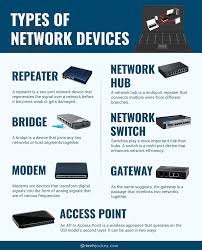
Unlocking the Potential of Essential Network Devices
The Essential Guide to Network Devices
Network devices are the backbone of modern communication systems, enabling data to flow seamlessly between devices and users. From routers to switches, each device plays a crucial role in establishing and maintaining network connections. Let’s delve into the world of network devices and explore their functions and importance.
Routers
Routers are perhaps the most well-known network device, responsible for directing data packets between networks. They determine the best path for data to travel, ensuring that information reaches its intended destination efficiently. Routers also provide security features such as firewall protection, safeguarding networks from external threats.
Switches
Switches are essential for connecting multiple devices within a local area network (LAN). Unlike routers, switches operate at the data link layer of the OSI model and use MAC addresses to forward data to the correct destination. Switches enable devices on the same network to communicate with each other quickly and reliably.
Modems
Modems serve as the gateway between a local network and the internet, converting digital signals from a computer into analog signals that can be transmitted over telephone lines or cable systems. Modems establish and maintain connections with internet service providers, allowing users to access online resources.
Access Points
Access points are used to extend wireless network coverage by providing a connection point for wireless devices. They enable users to connect wirelessly to a network, expanding connectivity beyond traditional wired connections. Access points are commonly used in homes, offices, and public spaces to create Wi-Fi networks.
Network Adapters
Network adapters, also known as network interface cards (NICs), allow devices such as computers or printers to connect to a network. They provide the physical interface between a device and the network medium, facilitating data transmission over wired or wireless connections.
Conclusion
In conclusion, network devices form the foundation of modern communication systems by facilitating connectivity and data exchange. Understanding the functions of routers, switches, modems, access points, and network adapters is essential for building efficient and reliable networks. By harnessing the capabilities of these devices, individuals and businesses can create robust networks that support their communication needs.
Understanding Network Devices: Key Questions and Answers
- What is the meaning of network devices?
- What are 7 network devices?
- How do I see all devices on my network?
- What is a network device?
- What are the 5 types of networking devices?
- What are defined network devices?
- What are the 10 network devices?
What is the meaning of network devices?
The term “network devices” refers to hardware components or equipment that are used to establish, maintain, and enhance communication within a network infrastructure. These devices play a vital role in facilitating the flow of data between computers, servers, and other connected devices. Common examples of network devices include routers, switches, modems, access points, and network adapters. Each device serves a specific function in ensuring that data is transmitted efficiently and securely across networks. Understanding the meaning of network devices is essential for building and managing effective networking systems that support seamless connectivity and data exchange.
What are 7 network devices?
The question “What are 7 network devices?” often arises in discussions about networking infrastructure. When considering network devices, seven key components come to mind: routers, switches, modems, access points, network adapters, firewalls, and hubs. Each of these devices plays a vital role in establishing and maintaining network connections, ensuring seamless communication and data transfer between devices within a network. Understanding the functions and capabilities of these seven network devices is essential for designing and managing efficient and secure networks in various settings, from homes to businesses and beyond.
How do I see all devices on my network?
One common query regarding network devices is, “How do I see all devices on my network?” To identify all devices connected to your network, you can use various methods depending on the size and complexity of your network. One straightforward approach is to access your router’s administration interface, where you can typically view a list of connected devices. Alternatively, network scanning tools can provide a comprehensive overview of all devices on your network, including their IP addresses and device types. By utilising these methods, you can gain valuable insights into the composition of your network and ensure efficient management of connected devices.
What is a network device?
A network device is a piece of hardware or software that enables communication and data exchange between devices within a network. These devices play a vital role in establishing connections, managing traffic, and ensuring the smooth flow of information across networks. Examples of network devices include routers, switches, modems, access points, and network adapters. Each device serves a specific function in facilitating network operations, such as directing data packets, connecting multiple devices, providing internet access, extending wireless coverage, and enabling device connectivity. Understanding the concept of network devices is essential for building and maintaining efficient networks that support modern communication needs.
What are the 5 types of networking devices?
The question “What are the 5 types of networking devices?” is a common query that often arises when exploring the components of a network infrastructure. The five key types of networking devices include routers, switches, modems, access points, and network adapters. Routers play a vital role in directing data packets between networks, while switches enable efficient communication between devices within a local area network. Modems act as gateways to the internet, facilitating connectivity between local networks and online resources. Access points extend wireless network coverage, allowing wireless devices to connect to a network. Network adapters serve as interfaces that enable devices to connect to networks via wired or wireless connections. Understanding these fundamental networking devices is essential for building and maintaining effective communication systems.
What are defined network devices?
Defined network devices refer to hardware components that have specific functions within a network infrastructure. These devices are designed to perform distinct tasks such as routing data packets, managing network traffic, or providing wireless connectivity. Examples of defined network devices include routers, switches, modems, access points, and network adapters. Each device plays a crucial role in establishing and maintaining network connections, ensuring efficient communication between devices and users. Understanding the purpose and capabilities of defined network devices is essential for building and managing effective networks that meet the communication needs of individuals and businesses.
What are the 10 network devices?
The question “What are the 10 network devices?” is a common query among individuals seeking to understand the essential components of networking infrastructure. While the specific list may vary depending on context and requirements, a typical selection of network devices includes routers, switches, modems, access points, network adapters, firewalls, hubs, repeaters, bridges, and gateways. Each of these devices serves a unique function in establishing and maintaining network connections, enabling data transmission and communication between devices within a network or across different networks. Understanding the roles and capabilities of these key network devices is fundamental to building and managing efficient and secure networks in various settings.